9 July 2016
Used speedtest app on iPhone to check the speed coming from the wireless router.
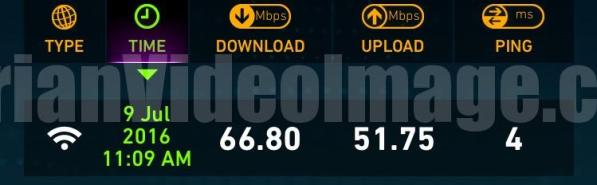
Puzzled why speed is still the same as the previous contract of 200mbps. Isn’t it supposed to be 1Gbps now?
7 JULY 2016
At night, many websites were not accessible thru the broadband. Even Twitter was not accessible. However, Google and Facebook were ok.
Tried accessing via my phone 4g and confirmed the sites were accessible.
So maybe there are some technical switching over going on.
Luckily I had no important conference call to make that night.
7 JULY 2016
Recontracted M1 home fibre broadband to 1GB at S$39/month for another 2 years.

https://www.m1.com.sg/Personal/BUNDLES%20AND%20PROMOTIONS/Promotions/Bundle%20Promotion/PKG206236
UPDATE – 29 December 2015: Using www.speedtest.net on a Windows 10 Laptop (Lenovo Helix)…

PREVIOUSLY – 2 August 2012:

Wow! Look at the upload speed!
That’s exactly what I need for sending videos to clients quickly.
Today our home is installed with the new M1’s fibre broadband.
The installation took less than 15 minutes.

Plug the yellow optic cable into the Open Net Box.

Power up the new fibre modem.
Then connect your laptop to test the speed with SpeedTest.
Next I must get a wifi router that is an N series or supports at least 300Mbps.
Check out 300Mbps Wifi routers…
Adrian Lee
http://AdrianVideoImage.com
PS:
My office broadband is now 10 times slower. Maybe I will start working from home.

Share:

Discover more from Adrian Video Image
Subscribe to get the latest posts sent to your email.


![[143]👋 How to Put a Video on Top of Another Video - Capcut Edit Tutorial](https://i0.wp.com/adrianvideoimage.com/wp-content/uploads/2024/07/How-to-Put-a-Video-On-Top-of-Another.jpg?fit=1199%2C1200&ssl=1&resize=40%2C40)


